 FastStone
FastStone Image Viewer Features
FastStone Image Viewer is far more than a picture viewer — it is a browser, converter and editor in one free Windows program. This guide walks through what it does, from everyday photo browsing to full-screen viewing, editing, batch conversion and slideshows.
The reason the same free tool has stayed popular for years is coverage: it opens practically any image format, edits on the spot, and manages whole folders without the weight of a full photo suite. Below is the complete picture of what version 8.5 offers, grouped the way you actually use it.
Browsing and viewing
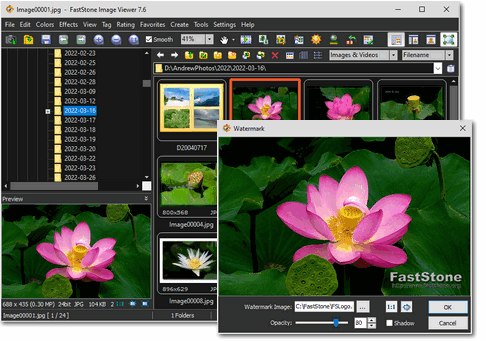
The main window mirrors Windows Explorer, so navigating your photos feels immediately familiar. A folder tree sits alongside a thumbnail strip and a large preview, and you can tag, rate and drag-and-drop images to organise them without a separate library step.
- Explorer-style browser: folder tree, thumbnails and preview together.
- True full-screen viewer: with zoom and fly-out toolbar panels.
- One-click magnifier: a customisable loupe for pixel-level detail.
- Side-by-side comparison: view up to four images at once.
- EXIF metadata: read shooting data and edit comments.
- Histogram: with a colour counter for exposure checks.
- Dual-monitor support: configure how the viewer spans screens.
- Touch gestures: tap, swipe and pinch on touch displays.
Editing tools
Editing is where FastStone Image Viewer goes beyond a simple viewer. It carries a genuine set of adjustment and retouch tools, all with multi-level undo and redo, so you can fix a photo without opening a heavier editor.
- Crop, resize and resample: eleven resampling algorithms for clean results.
- Rotate and flip: lossless for JPEG where possible.
- Sharpen and blur: plus lighting, colour and curves adjustments.
- Red-eye removal: quick correction for flash portraits.
- Clone stamp and healing brush: remove blemishes and objects.
- Multi-level undo/redo: step back through every change.
Effects, drawing and annotation
A library of effects and drawing tools turns the viewer into a light creative tool — handy for quick graphics, screenshots and marked-up images without launching separate software.
- Colour effects: grayscale, sepia, negative and RGB adjustment.
- Special effects: drop shadow, framing, bump map, sketch, oil painting and lens.
- Drawing tools: text, lines, highlights, rectangles, ovals and callouts.
- Built-in screen capture: grab regions of the screen directly.
- Themes: bright, gray and dark interface options.
- External editor link: hand an image to Photoshop or another tool.
Supported formats
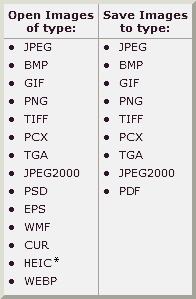
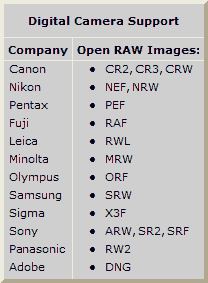
FastStone Image Viewer reads and writes every mainstream image type, including modern formats such as HEIC and WEBP and the raw files from most camera makers. That breadth is a big reason people keep it installed as their default viewer.
Formats include: BMP, JPEG, JPEG 2000, animated GIF, PNG, PCX, PSD, EPS, TIFF, WMF, ICO, HEIC, WEBP, TGA and PDF, plus camera raw files (CRW, CR2, NEF, PEF, RAF, MRW, ORF, SRF, ARW, DNG and more).
Batch processing and slideshows
For anyone handling lots of photos at once, the batch tools save real time. You can convert a whole folder to another format, rename by pattern, and apply resizing in a single pass. The slideshow engine is unusually rich for a free viewer.
- Batch convert and rename: process hundreds of files together.
- Slideshow: 150+ transition effects with background music.
- Contact sheet: print thumbnail index pages.
- Wallpaper montage: build a desktop background from several photos.
- Email attachments: resize and send images without leaving the app.
- Scanner acquisition: batch-scan to PDF, TIFF, JPEG or PNG.
Photo management and organisation
Beyond viewing and editing, the program helps you keep a photo collection in order without a heavyweight catalogue. Tags and star ratings let you mark keepers and reject duds, and everything is done in place on your own folders — there is no proprietary library to import into or get locked out of. Drag-and-drop moves and copies files between folders, and the thumbnail view can be sized and sorted to suit how you work.
- Tagging and rating: flag and score images as you browse.
- Folder-based: works directly on your files, no import step.
- Fast thumbnails: a responsive grid even in large folders.
- Configurable mouse wheel: scroll, zoom or flip pages your way.
Combined with the batch tools, this makes it practical to bring order to a big, messy folder of photos in a single session — then hand the resized results to Photo Resizer for bulk output.
Why it stays a favourite
Plenty of free viewers exist, but this one keeps its place on Windows PCs for a simple reason: it does the work of several programs at once, quickly, and without cost for personal use. You get a capable editor, a broad format reader, a batch converter and a slideshow engine in a single lightweight download — and it installs cleanly with no strings attached. For most people it replaces both the built-in Windows viewer and a separate light editor. If that sounds useful, the download page has the installer and portable options, and the FAQ answers the licensing and format questions.
Printing and output
When it is time to get images off the screen, the viewer gives full control over the printed page — position, size and margins — and a Save As dialog that shows a live quality-versus-size comparison so you can pick the right compression before saving. A configurable mouse wheel and dual-instance support round out the day-to-day comfort features.
All of this is in the single free download. Ready to get it? Head to the download page for the installer and portable options, or read whether FastStone is safe before you install.
Common questions
What image formats does it support?
All major formats including BMP, JPEG, HEIC, WEBP, GIF, PNG, PCX, PSD, TIFF, WMF, ICO, TGA, PDF and camera raw files.
Can it edit photos, not just view them?
Yes. It includes crop, resize, resample, red-eye removal, colour and curve adjustments, clone stamp, healing brush, drawing tools and many effects.